How do I collect membership dues through BoxBoard?
BoxBoard can collect recurring membership dues from your members and send the money straight to your bank. You set the plans, members pay by card, and payouts run on Stripe's schedule. You are the merchant — refunds and payouts stay in your control.
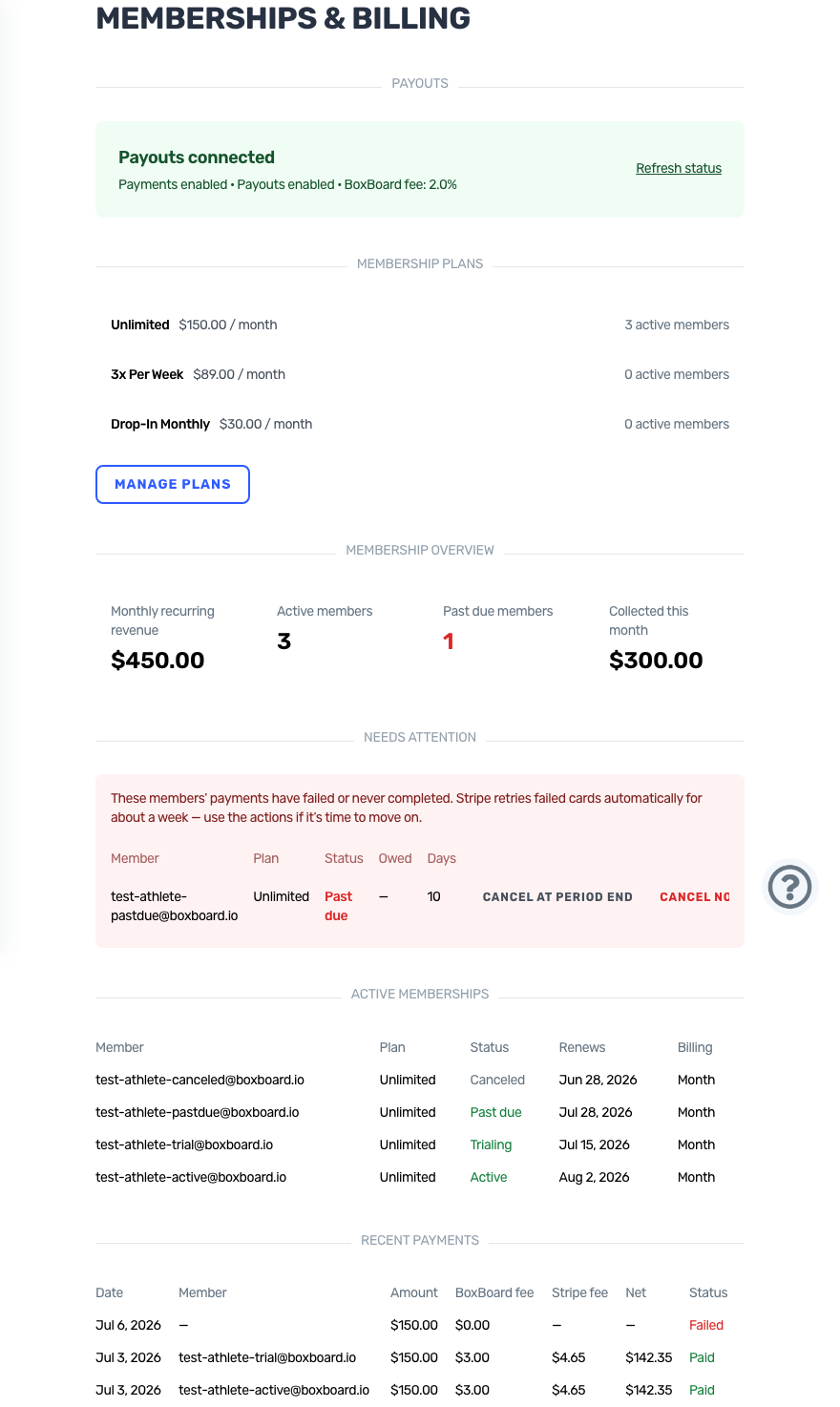
Set up payouts (about 5 minutes)
- Go to Box Administration → Memberships (or tap Set up memberships on your dashboard checklist).
- Click Set up payouts. Stripe walks you through phone verification, your details, and your bank account — BoxBoard never sees your bank credentials.
- You land back on the Memberships page showing Payouts connected once payments are enabled.
Create your plans
From Memberships → Manage plans → Create plan, set a price, an interval (monthly, every 3 months, yearly), and an optional free trial. Changing a price later never affects current members — they keep the price they joined at.
How members pay
Members of your gym see My Membership in their menu, pick a plan, and pay on Stripe's secure checkout. New members you invite are prompted to start their membership after they finish joining.
Requirements
Member billing is included with an active BoxBoard subscription — there's no extra monthly fee to turn it on. It's entirely optional: if you bill elsewhere, just don't connect payouts.